
Virhekoodi: 0x803fa067
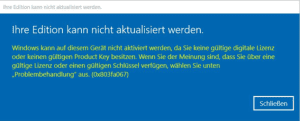
Tämä virhe ilmenee usein, kun yrität päivittää Microsoftin Windows 10 Home-versiosta Professional-versioon tai kun Home-versio on jo aktivoitu/liitetty digitaaliseen lisenssiin.
Vaihtoehto 1: Päivitys konsolin kautta
Käynnistä komentorivi järjestelmänvalvojan oikeuksin ja anna seuraava komento:
DISM /Online /Get-TargetEditions /Get-TargetEditions
kanssa
DISM /Online /Get-CurrentEdition (Hae nykyinen painos)
Voit päivittää esimerkiksi Home-versiosta Pro-versioon seuraavalla komennolla:
changepk.exe /productkey VK7JG-NPHTM-C97JM-9MPGT-3V66T
Odota, että päivitysprosessi on valmis. Kun päivitys on onnistunut, aktivoi Professional-versio ostetulla tuoteavaimella.
Vaihtoehto 2: Päivitys yleisavainta käyttäen
Jos sinulla on ongelmia OEM-avaimen kanssa, Microsoft on tarjonnut geneerisen tuoteavaimen, jota voidaan käyttää päivityksessä:
VK7JG-NPHTM-C97JM-9MPGT-3V66T
Jos Microsoft Windows näyttää virheen, kuten virhekoodin 0x803fa067, toista prosessi ja katkaise tilapäisesti yhteys Internetiin esimerkiksi irrottamalla LAN-kaapeli, poistamalla LAN-sovitin käytöstä tai poistamalla Wi-Fi käytöstä. Syötä sitten koodi uudelleen.
Vaihtoehto 3: Offline-aktivointi
- Katkaise internet-yhteys (irrota verkkokaapeli tai poista Wi-Fi käytöstä).
- Paina WIN+R ja kirjoita tekstikenttään “SLUI”. Ohjattu aktivointi pitäisi avautua. Syötä päivitysavain ja/tai Microsoft Windows 10 Pro -tuoteavain, joka lähetettiin sinulle sähköpostitse.
- Selvä. Microsoft Windows 10/11 Pro pitäisi nyt aktivoitua.
 Suomi
Suomi  English
  Deutsch
  Italiano
  Français
  Nederlands
  Norsk bokmål
  Svenska
  Dansk
Dansk  Español
  Ελληνικά