
Feilkode: 0x803fa067
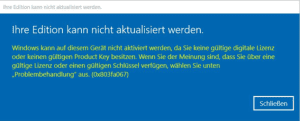
Denne feilen oppstår ofte når du prøver å oppgradere fra Microsoft Windows 10 Home til Professional, eller når Home-versjonen din allerede er aktivert/koblet til en digital lisens.
Alternativ 1: Oppgradering via konsoll
Start ledeteksten med administratorrettigheter, og skriv inn følgende kommando:
DISM /Online /Get-TargetEditions
med
DISM /Online /Get-CurrentEdition
For å oppgradere, for eksempel fra Home til Pro, bruker du følgende kommando:
changepk.exe /produktnøkkel VK7JG-NPHTM-C97JM-9MPGT-3V66T
Vent til oppgraderingsprosessen er fullført. Etter vellykket oppgradering aktiverer du Professional-versjonen med den kjøpte produktnøkkelen.
Alternativ 2: Oppgradering ved hjelp av generisk nøkkel
Hvis du får problemer med en OEM-nøkkel, har Microsoft laget en generisk produktnøkkel som kan brukes til oppgraderingen:
VK7JG-NPHTM-C97JM-9MPGT-3V66T
Hvis Microsoft Windows viser en feil, for eksempel feilkode 0x803fa067, gjentar du prosessen og kobler deg midlertidig fra Internett, for eksempel ved å fjerne LAN-kabelen, deaktivere LAN-kortet eller slå av Wi-Fi. Skriv deretter inn koden på nytt.
Alternativ 3: Frakoblet aktivering
- Koble fra Internett-tilkoblingen (fjern nettverkskabelen eller deaktiver Wi-Fi).
- Trykk på WIN+R og skriv inn “SLUI” i tekstfeltet. Aktiveringsveiviseren åpnes. Skriv inn oppgraderingsnøkkelen og/eller produktnøkkelen til Microsoft Windows 10 Pro som du har fått tilsendt via e-post.
- Ferdig. Microsoft Windows 10/11 Pro skal nå være aktivert.
 Norsk bokmål
  English
  Deutsch
  Italiano
  Français
  Nederlands
  Suomi
Suomi  Svenska
  Dansk
Dansk  Español
  Ελληνικά