
Foutcode: 0x803fa067
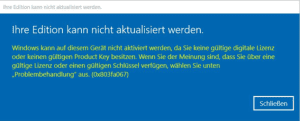
Deze fout treedt vaak op wanneer je probeert te upgraden van Microsoft Windows 10 Home naar Professional of wanneer je Home-versie al geactiveerd/gekoppeld is met een digitale licentie.
Optie 1: Upgraden via console
Start de opdrachtprompt met beheerdersrechten en voer het volgende commando in:
DISM /Online /Get-TargetEditions
met
DISM /Online /Get-CurrentEdition
Om bijvoorbeeld van Home naar Pro te upgraden, gebruik je het volgende commando:
changepk.exe /productkey VK7JG-NPHTM-C97JM-9MPGT-3V66T
Wacht tot het upgradeproces is voltooid. Na het succesvol upgraden activeer je jouw Professional versie met de aangekochte productsleutel.
Optie 2: Upgraden met een generieke sleutel
Als je problemen ondervindt met een OEM-sleutel, heeft Microsoft een generieke productsleutel geleverd die kan worden gebruikt voor de upgrade:
VK7JG-NPHTM-C97JM-9MPGT-3V66T
Als Microsoft Windows een fout weergeeft, zoals foutcode 0x803fa067, herhaal dan het proces en verbreek tijdelijk de verbinding met internet, bijvoorbeeld door de LAN-kabel te verwijderen, de LAN-adapter uit te schakelen of wifi uit te schakelen. Voer de code vervolgens opnieuw in.
Optie 3: Offline activering
- Verbreek de verbinding met je internetverbinding (verwijder de netwerkkabel of schakel Wi-Fi uit).
- Druk op WIN+R en voer “SLUI” in het tekstveld in. De activeringswizard wordt geopend. Voer de upgradesleutel en/of de productsleutel van Microsoft Windows 10 Pro in die u per e-mail is toegestuurd.
- Gereed. Microsoft Windows 10/11 Pro zou nu geactiveerd moeten zijn.
 Nederlands
  English
  Deutsch
  Italiano
  Français
  Suomi
Suomi  Norsk bokmål
  Svenska
  Dansk
Dansk  Español
  Ελληνικά